# 65.047 How to configure SmarterMail on the Android Gmail app using IMAP

<table border="1" id="bkmrk-docs" style="border-collapse: collapse; width: 100%;"><colgroup><col style="width: 50%;"></col><col style="width: 50%;"></col></colgroup><tbody><tr><td>![](https://hub.safeharboursupport.com/media/KBImages/safeharbour-logo-colour-nobg-500x140.png)</td><td style="background-color: rgb(247, 91, 0);">### <span style="color: rgb(255, 255, 255);">**Docs**</span>

</td></tr></tbody></table>

**<span data-contrast="auto">Document Control</span>**<span data-ccp-props="{"201341983":0,"335559739":160,"335559740":259}"> </span>

<table aria-rowcount="9" data-tablelook="1696" data-tablestyle="MsoTableGrid" id="bkmrk-document-name%C2%A0-35.01" style="width: 100%;"><tbody><tr aria-rowindex="1"><td data-celllook="0" style="width: 18.5325%;">**<span data-contrast="auto">Document Name</span>**<span data-ccp-props="{"201341983":0,"335559740":259}"> </span>

</td><td colspan="3" data-celllook="0" style="width: 81.4668%;"><span data-ccp-props="{"201341983":0,"335559740":259}">65.047 How to configure SmarterMail on the Android GMail using IMAP</span>

</td></tr><tr aria-rowindex="2"><td data-celllook="0" style="width: 18.5325%;">**<span data-contrast="auto">Version</span>**<span data-ccp-props="{"201341983":0,"335559740":259}"> </span>

</td><td colspan="3" data-celllook="0" style="width: 81.4668%;"><span data-contrast="auto">v1.1 Current</span>

</td></tr><tr aria-rowindex="3"><td data-celllook="0" style="width: 18.5325%;">**<span data-contrast="auto">Author</span>**<span data-ccp-props="{"201341983":0,"335559740":259}"> </span>

</td><td colspan="3" data-celllook="0" style="width: 81.4668%;"><span data-contrast="auto">Neil Tancock, IT Services (Safeharbour Support Ltd), <neil@safeharboursupport.com></span>[<span data-ccp-props="{"201341983":0,"335559740":259}"> </span>](mailto:neil@safeharboursupport.com)

</td></tr><tr aria-rowindex="4"><td data-celllook="0" style="width: 18.5325%;">**<span data-contrast="auto">Approval</span>**<span data-ccp-props="{"201341983":0,"335559740":259}"> </span>

</td><td colspan="3" data-celllook="0" style="width: 81.4668%;"><span data-contrast="auto">Safeharbour Support</span><span data-ccp-props="{"201341983":0,"335559740":259}"> </span>

</td></tr><tr aria-rowindex="5"><td data-celllook="0" style="width: 18.5325%;">**<span data-contrast="auto">Approval date</span>**<span data-ccp-props="{"201341983":0,"335559740":259}"> </span>

</td><td data-celllook="0" style="width: 22.3819%;"><span data-contrast="auto">01-APR-2025</span><span data-ccp-props="{"134233117":false,"134233118":false,"201341983":0,"335551550":1,"335551620":1,"335559685":0,"335559737":0,"335559738":0,"335559739":0,"335559740":259}"> </span>

</td><td data-celllook="0" style="width: 29.5424%;">**<span data-contrast="auto">Review date</span>**<span data-ccp-props="{"201341983":0,"335559740":259}"> </span>

</td><td data-celllook="0" style="width: 29.5424%;"><span data-contrast="auto">31-MAR-2027</span><span data-ccp-props="{"134233117":false,"134233118":false,"201341983":0,"335551550":1,"335551620":1,"335559685":0,"335559737":0,"335559738":0,"335559739":0,"335559740":259}"> </span>

</td></tr><tr aria-rowindex="6"><td data-celllook="0" style="width: 18.5325%;">**<span data-contrast="auto">Absract</span>**<span data-ccp-props="{"201341983":0,"335559740":259}"> </span>

</td><td colspan="3" data-celllook="0" style="width: 81.4668%;">SmarterMail users can sync their email to their Android GMail app by configuring an IMAP account. With an IMAP account, you will create a two-way sync between SmarterMail and the device, where all emails folders are synced. This means that when you log into the SmarterMail Web interface, actions you performed within the Mail app on your iPhone or iPad will automatically appear in the Web interface, and vice versa.

</td></tr><tr aria-rowindex="7"><td data-celllook="0" style="width: 18.5325%;">**<span data-contrast="auto">Scope</span>**<span data-ccp-props="{"201341983":0,"335559740":259}"> </span>

</td><td colspan="3" data-celllook="0" style="width: 81.4668%;"><span data-contrast="auto">This document applies to all clients of Safeharbour Support Ltd</span>

</td></tr><tr aria-rowindex="8"><td data-celllook="0" style="width: 18.5325%;">**<span data-contrast="auto">Inputs</span>**<span data-ccp-props="{"201341983":0,"335559740":259}"> </span>

</td><td colspan="3" data-celllook="0" style="width: 81.4668%;"><span data-contrast="auto">None</span><span data-ccp-props="{"201341983":0,"335559740":259}"> </span>

</td></tr><tr aria-rowindex="9"><td data-celllook="0" style="width: 18.5325%;">**<span data-contrast="auto">Outputs</span>**<span data-ccp-props="{"201341983":0,"335559740":259}"> </span>

</td><td colspan="3" data-celllook="0" style="width: 81.4668%;"><span data-contrast="auto">None</span>

</td></tr></tbody></table>

<span data-ccp-props="{"201341983":0,"335559739":160,"335559740":259}"> </span>

**<span data-contrast="auto">Change Control</span>**<span data-ccp-props="{"201341983":0,"335559739":160,"335559740":259}"> </span>

<table aria-rowcount="3" data-tablelook="1696" data-tablestyle="MsoTableGrid" id="bkmrk-date%C2%A0-author%C2%A0-versio" style="width: 98.5185%;"><tbody><tr aria-rowindex="1"><td data-celllook="0" style="width: 14.4291%;">**<span data-contrast="auto">Date</span>**<span data-ccp-props="{"201341983":0,"335559740":259}"> </span>

</td><td data-celllook="0" style="width: 17.8168%;">**<span data-contrast="auto">Author</span>**<span data-ccp-props="{"201341983":0,"335559740":259}"> </span>

</td><td data-celllook="0" style="width: 12.2079%;">**<span data-contrast="auto">Version</span>**<span data-ccp-props="{"201341983":0,"335559740":259}"> </span>

</td><td data-celllook="0" style="width: 55.5459%;">**<span data-contrast="auto">Change</span>**<span data-ccp-props="{"201341983":0,"335559740":259}"> </span>

</td></tr><tr aria-rowindex="2"><td data-celllook="0" style="width: 14.4291%;"><span data-contrast="auto"><span data-ccp-props="{"201341983":0,"335559740":259}">01-APR-2025</span></span><span data-ccp-props="{"201341983":0,"335559740":259}"> </span>

</td><td data-celllook="0" style="width: 17.8168%;"><span data-contrast="auto">Neil Tancock</span><span data-ccp-props="{"201341983":0,"335559740":259}"> </span>

</td><td data-celllook="0" style="width: 12.2079%;"><span data-contrast="auto">0.0</span><span data-ccp-props="{"201341983":0,"335559740":259}"> </span>

</td><td data-celllook="0" style="width: 55.5459%;"><span data-contrast="auto">First version</span>

</td></tr><tr aria-rowindex="3"><td data-celllook="0" style="width: 14.4291%;"><span data-ccp-props="{"201341983":0,"335559740":259}">01-APR-2025 </span>

</td><td data-celllook="0" style="width: 17.8168%;"><span data-ccp-props="{"201341983":0,"335559740":259}">Neil Tancock </span>

</td><td data-celllook="0" style="width: 12.2079%;"><span data-ccp-props="{"201341983":0,"335559740":259}">1.0 </span>

</td><td data-celllook="0" style="width: 55.5459%;"><span data-ccp-props="{"201341983":0,"335559685":0,"335559740":259}">Approved</span>

</td></tr></tbody></table>

<span data-contrast="auto">--------------------------------------------&lt;START OF DOCUMENT&gt; --------------------------------------------</span><span data-ccp-props="{"201341983":0,"335551550":2,"335551620":2,"335559739":160,"335559740":259}"> </span>

<div id="bkmrk-symptoms-cyber-prote"><div class="block block-system no-title odd first last block-count-6 block-region-content block-main"><div class="one-column at-panel panel-display clearfix"><div class="centered-section"><div class="region region-one-main"><div class="region-inner clearfix">  
</div></div></div></div></div></div>**Follow these steps to configure a SmarterMail IMAP connection on an Andriod device**  
Note: We will have sent you your email hostname, username and password in a welcome email. Please have that to hand before starting this procedure. If you don't have it, please contact us and we will re-send it to you.

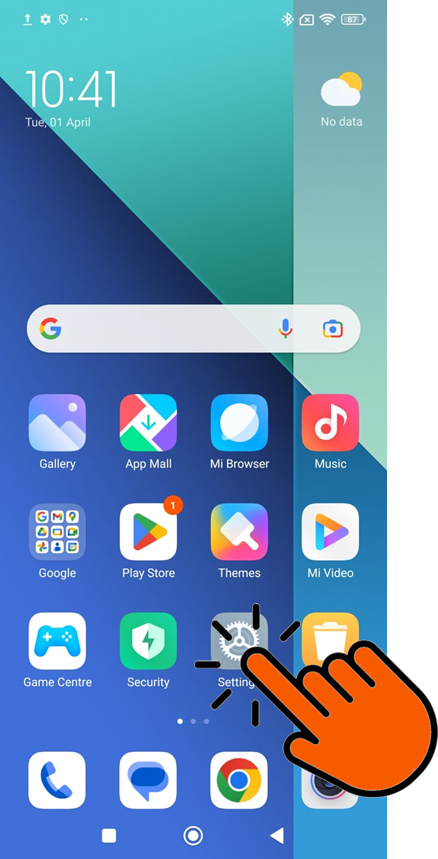
<table border="1" id="bkmrk-1.-open-your-setting" style="border-collapse: collapse; width: 100%;"><colgroup><col style="width: 50.0618%;"></col><col style="width: 50.0618%;"></col></colgroup><tbody><tr><td>1\. Open your Settings on your phone:

![](https://docs.safeharboursupport.com/uploads/images/gallery/2025-04/Ns2faaQhCRBU80FH-embedded-image-vs5d2nvt.png)

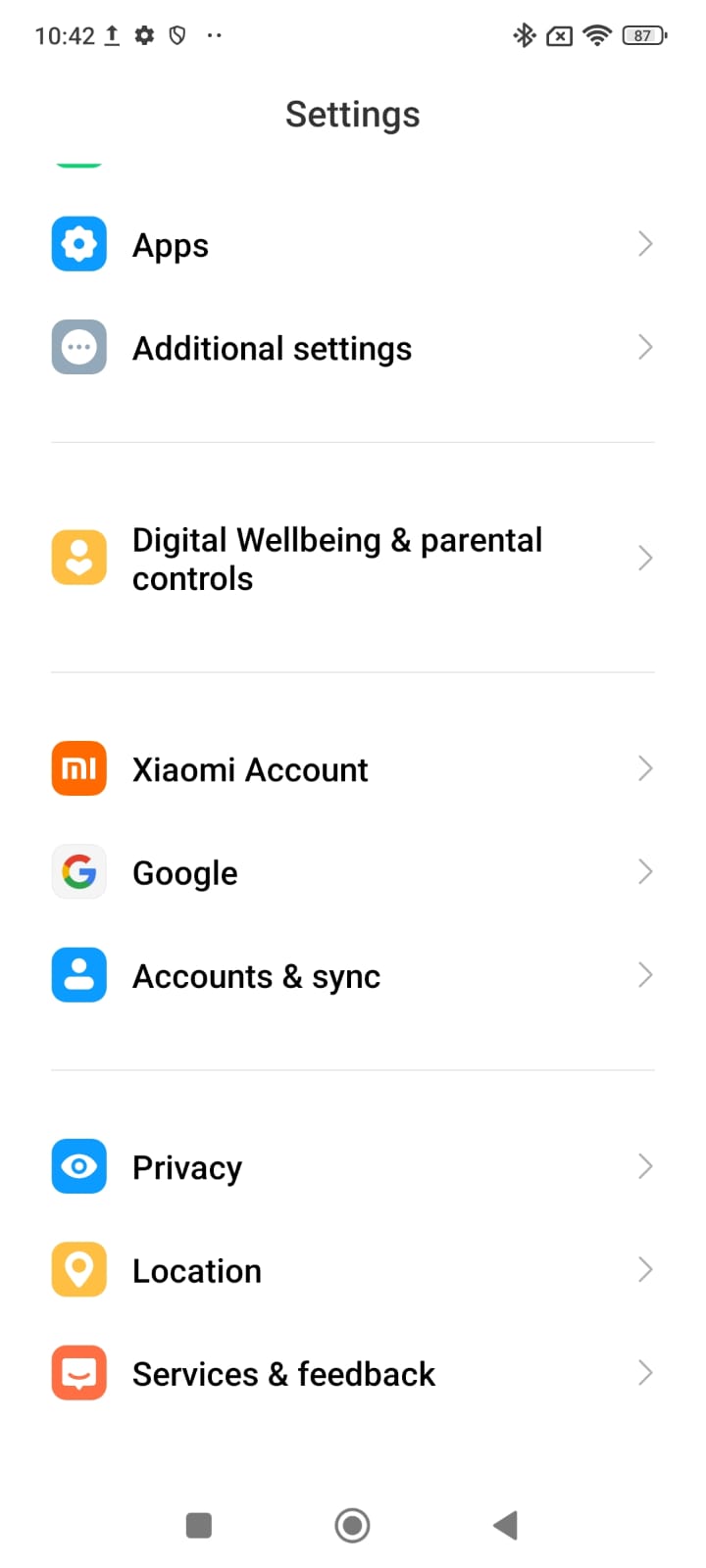
</td><td>2. Scroll down and click Accounts &amp; sync:  
[![WhatsApp Image 2025-04-01 at 10.51.05_3838f7b1.jpg](https://docs.safeharboursupport.com/uploads/images/gallery/2025-04/scaled-1680-/Uymxf84o3gTC0vrk-whatsapp-image-2025-04-01-at-10-51-05-3838f7b1.jpg)](https://docs.safeharboursupport.com/uploads/images/gallery/2025-04/Uymxf84o3gTC0vrk-whatsapp-image-2025-04-01-at-10-51-05-3838f7b1.jpg)

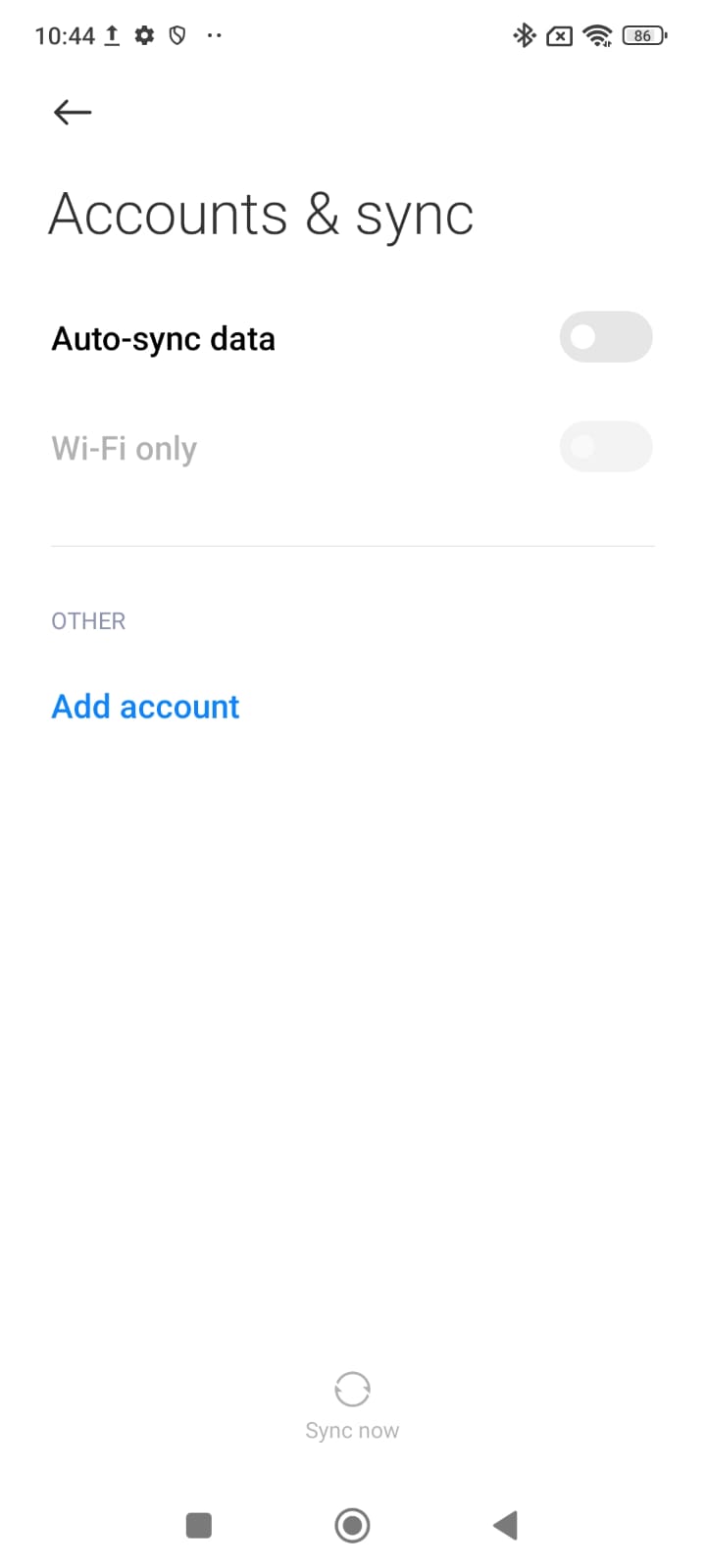
</td></tr><tr><td>3. Click on Add account:  
[![WhatsApp Image 2025-04-01 at 10.51.05_b08a81ee.jpg](https://docs.safeharboursupport.com/uploads/images/gallery/2025-04/scaled-1680-/RIZRWqFYITJCjE3g-whatsapp-image-2025-04-01-at-10-51-05-b08a81ee.jpg)](https://docs.safeharboursupport.com/uploads/images/gallery/2025-04/RIZRWqFYITJCjE3g-whatsapp-image-2025-04-01-at-10-51-05-b08a81ee.jpg)

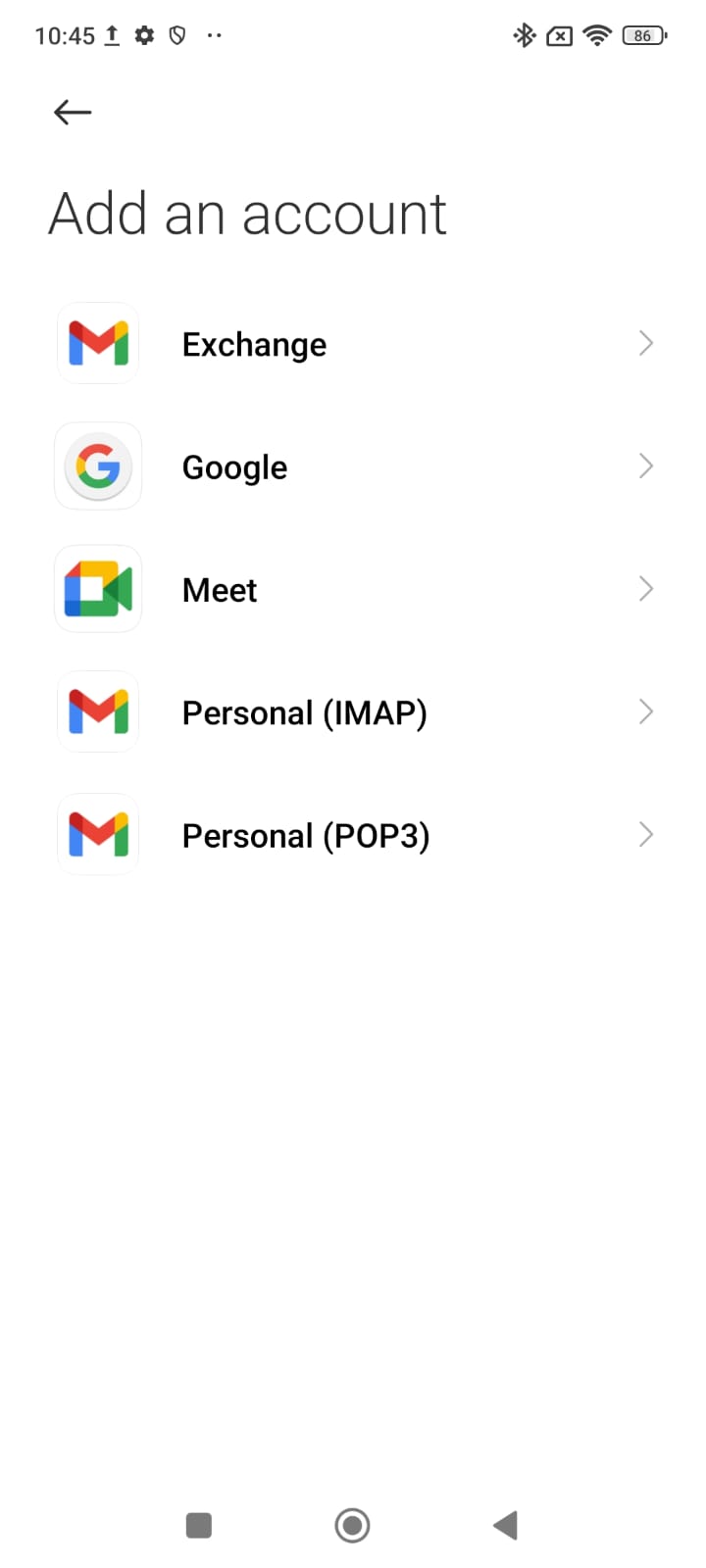
</td><td>4. Click on Personal (IMAP)  
[![WhatsApp Image 2025-04-01 at 10.51.04_9328d008.jpg](https://docs.safeharboursupport.com/uploads/images/gallery/2025-04/scaled-1680-/WfoE6D9IA2iyN0ul-whatsapp-image-2025-04-01-at-10-51-04-9328d008.jpg)](https://docs.safeharboursupport.com/uploads/images/gallery/2025-04/WfoE6D9IA2iyN0ul-whatsapp-image-2025-04-01-at-10-51-04-9328d008.jpg)

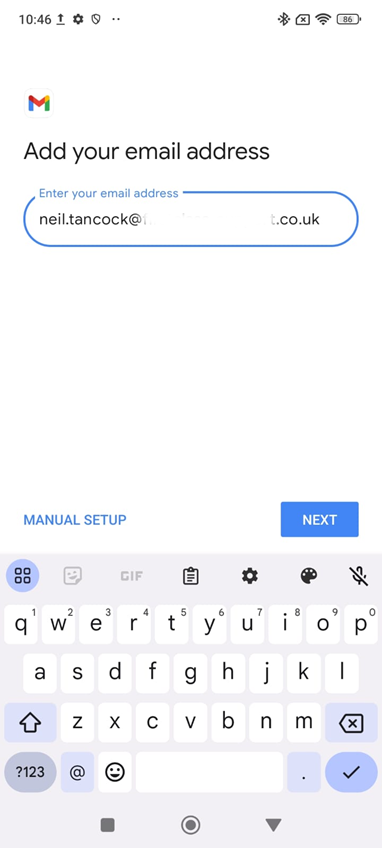
</td></tr><tr><td>5\. Add your email address and click \[Next\]:

[![image.png](https://docs.safeharboursupport.com/uploads/images/gallery/2025-04/scaled-1680-/4EPQlzWPM4jc3m6o-image.png)](https://docs.safeharboursupport.com/uploads/images/gallery/2025-04/4EPQlzWPM4jc3m6o-image.png)
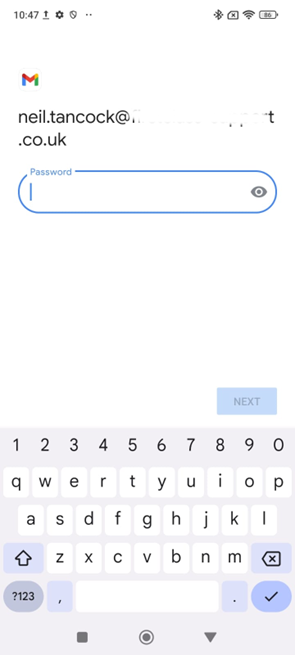
</td><td>6. Enter your password and click \[Next\]:  
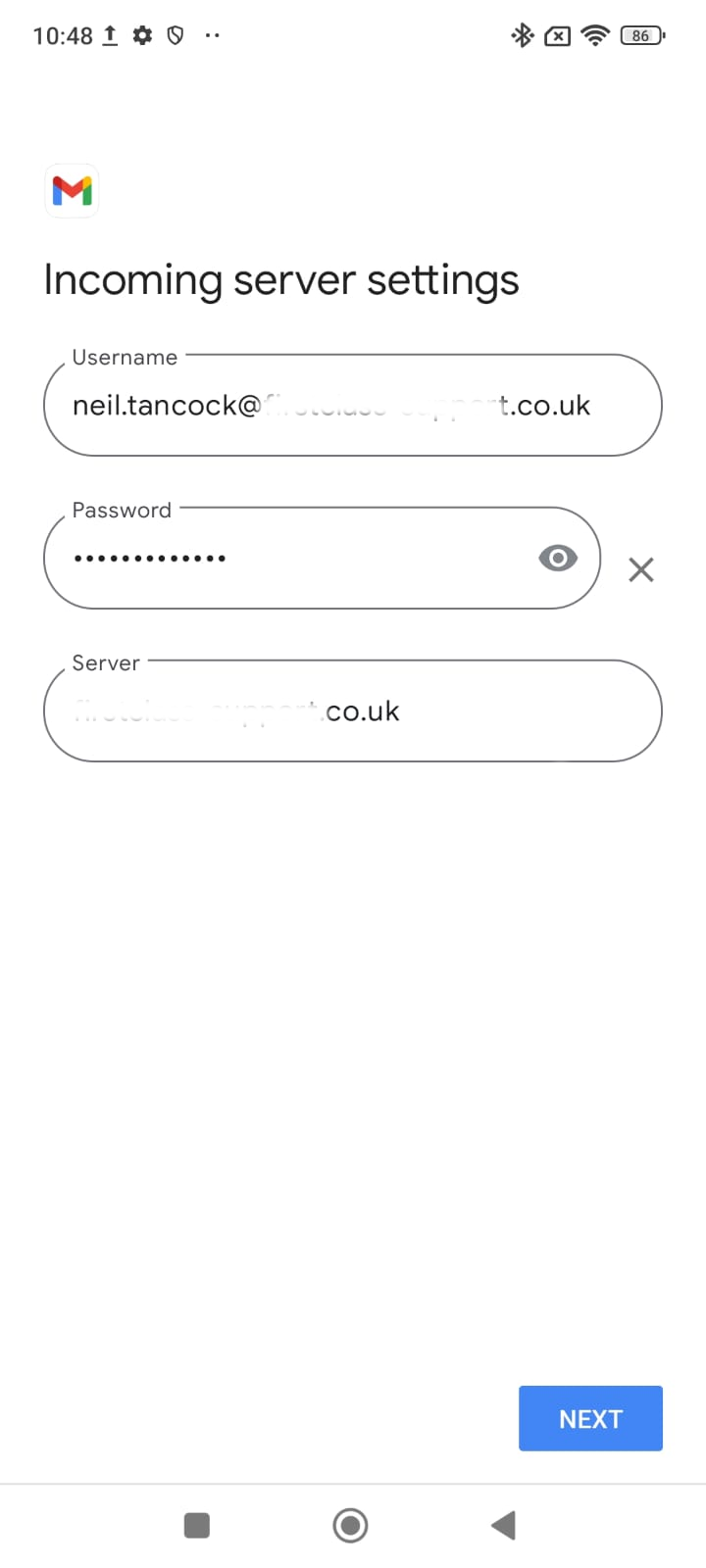
![](https://docs.safeharboursupport.com/uploads/images/gallery/2025-04/cqLpUEIl4YLqMuxy-embedded-image-a8wbflxk.png)</td></tr><tr><td>7. On Incoming server settings, change the Server to  
mail.firstclass-support.co.uk and click \[Next\]  
[![image.png](https://docs.safeharboursupport.com/uploads/images/gallery/2025-04/scaled-1680-/n7H1tSRzmA0jpznh-image.png)](https://docs.safeharboursupport.com/uploads/images/gallery/2025-04/n7H1tSRzmA0jpznh-image.png)
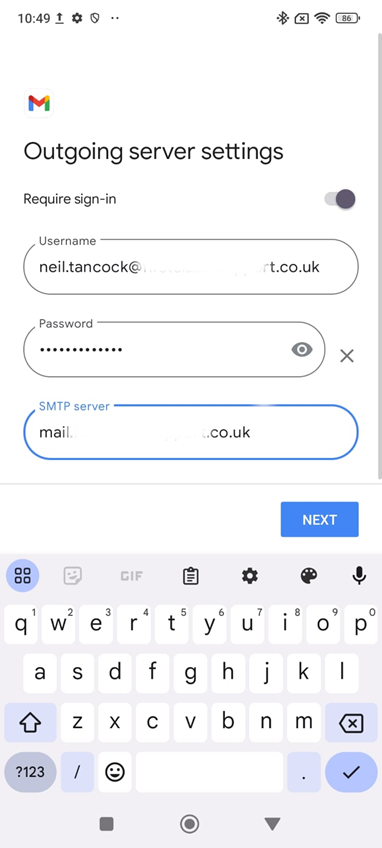
</td><td>8. On Outgoing server settings, change the SMTP Server to mail.firstclass-support.co.uk and click \[Next\]:  
[![image.png](https://docs.safeharboursupport.com/uploads/images/gallery/2025-04/scaled-1680-/gTCBMbTi9dgQRRab-image.png)](https://docs.safeharboursupport.com/uploads/images/gallery/2025-04/gTCBMbTi9dgQRRab-image.png)
</td></tr><tr><td>9\. On Account options, change nothing and click \[Next\]:

[![WhatsApp Image 2025-04-01 at 10.51.03_acb0c05f.jpg](https://docs.safeharboursupport.com/uploads/images/gallery/2025-04/scaled-1680-/RxLwGuYI4BXDTnu3-whatsapp-image-2025-04-01-at-10-51-03-acb0c05f.jpg)](https://docs.safeharboursupport.com/uploads/images/gallery/2025-04/RxLwGuYI4BXDTnu3-whatsapp-image-2025-04-01-at-10-51-03-acb0c05f.jpg)
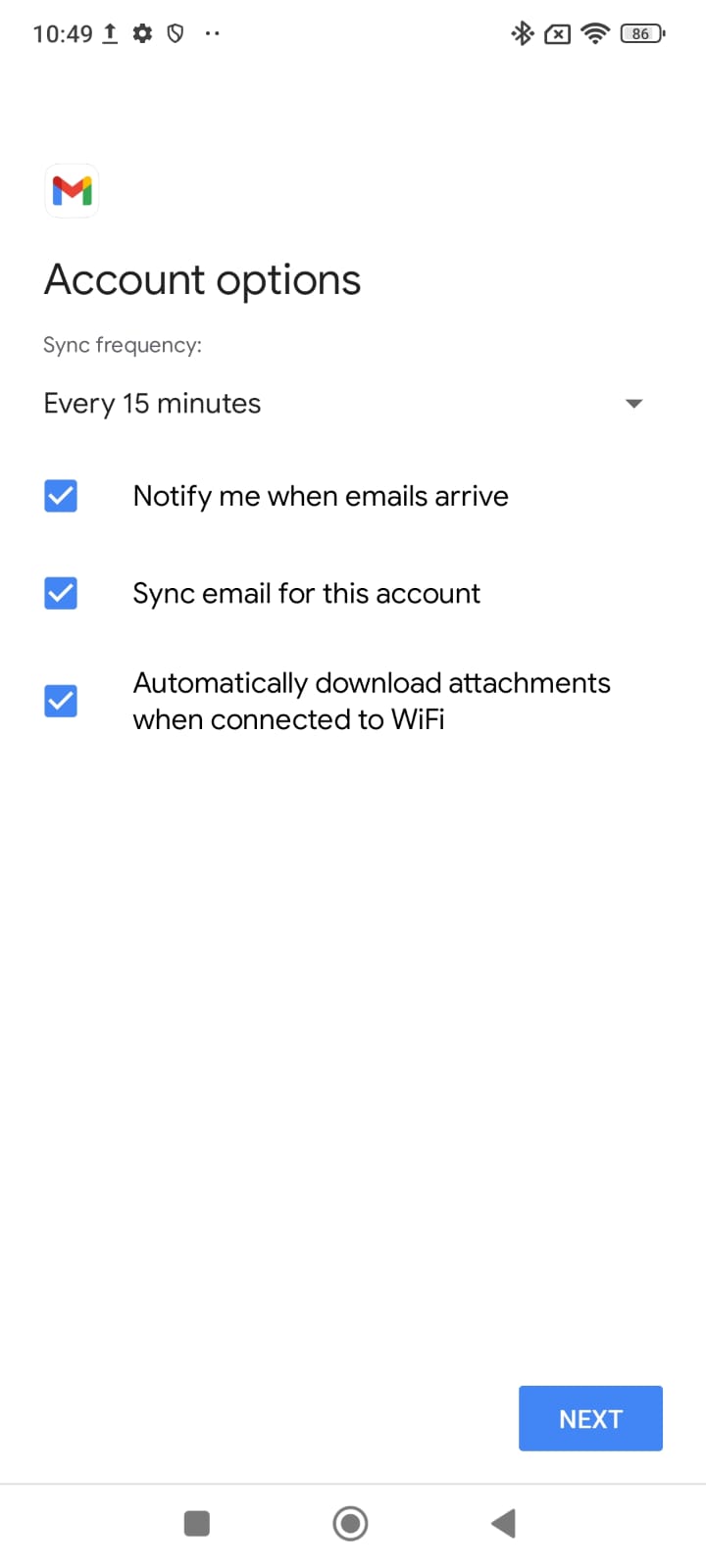
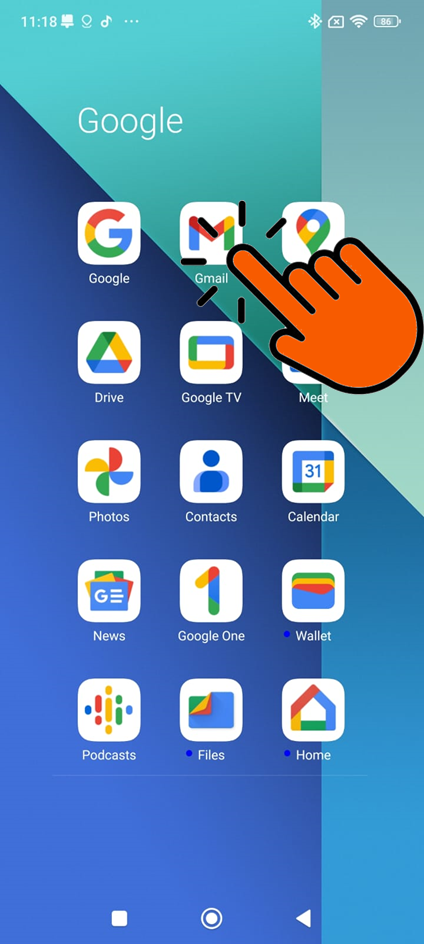
</td><td>10. That's it - your emails are now in your Gmail app:  
![](https://docs.safeharboursupport.com/uploads/images/gallery/2025-04/tqN5ERmk0pM5Yxbt-embedded-image-fsbwalgv.png)</td></tr></tbody></table>

<span data-contrast="auto">--------------------------------------------&lt;END OF DOCUMENT&gt; --------------------------------------------</span><span data-ccp-props="{"201341983":0,"335551550":2,"335551620":2,"335559739":160,"335559740":259}"> </span>

<table border="1" id="bkmrk-need-help%3F%C2%A0-get-in-t" style="margin-left: auto; margin-right: auto; width: 71.4432%; height: 153.563px;"><tbody><tr style="height: 22.3906px;"><td style="width: 97.8756%; height: 22.3906px; text-align: center;"><span style="color: rgb(4,121,181);">**Need help? G**</span><span style="color: rgb(4,121,181);">**et in touch!**</span>

</td></tr><tr style="height: 131.172px;"><td style="width: 97.8756%; height: 131.172px;">You can call us on [01752 373000](tel:01752373000), option 2 or, if you are on Number Club, just call extension 3001

You can email us at <hub@safeharboursupport.com>  
  
You can chat &amp; Collaborate with us at [https://kite.wildix.com/nc-a12/3001](https://kite.wildix.com/nc-a12/3001)

You can Whatsapp us right here: [https://wa.me/441752373000](https://wa.me/441752373000)

</td></tr><tr><td style="width: 97.8756%;">![](https://hub.safeharboursupport.com/media/KBImages/safeharbour-logo-colour-nobg-500x140.png)

</td></tr></tbody></table>

<span data-ccp-props="{"201341983":0,"335559739":160,"335559740":259}"> </span>

<span data-ccp-props="{"201341983":0,"335559739":160,"335559740":259}"> </span>

<span data-ccp-props="{"201341983":0,"335559739":160,"335559740":259}"> </span>